Affiliate disclosure: The systeme.io service button at the end of this article is an affiliate link. We may earn a commission if you sign up through it.
“There is a free plan, but will I have to pay before I can actually use it?” If you are building a small business around a job or family commitments, researching that question can consume the time you meant to spend creating something useful. Another recurring subscription is a decision worth making deliberately.
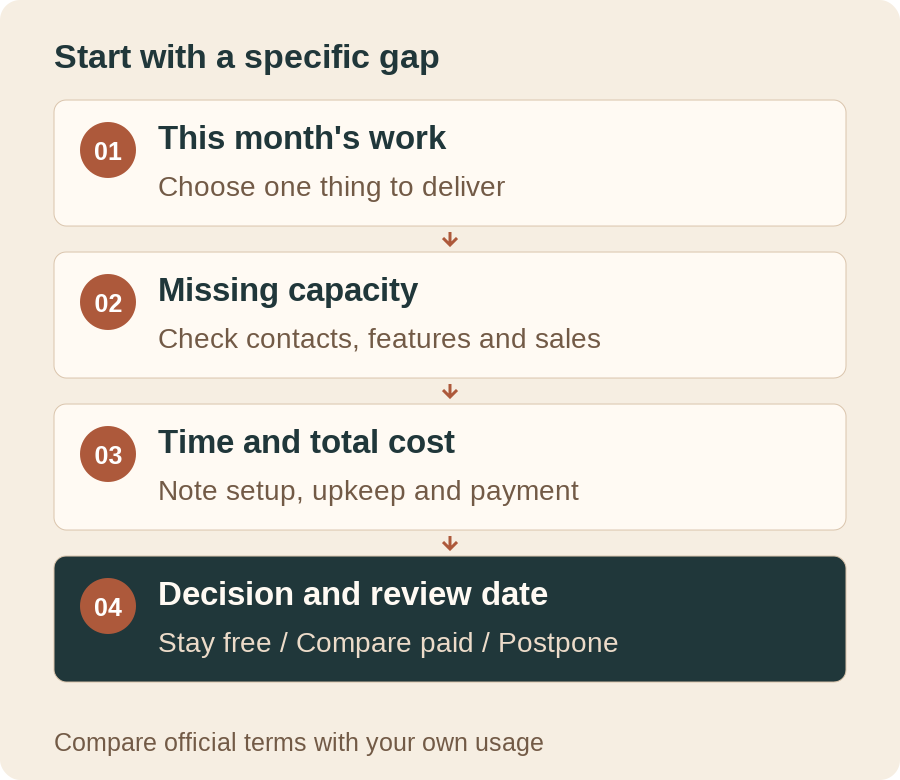
Start with one sentence: What do I need to run this month, and which specific limit prevents it? Separating a current task from a feature you might use someday makes the decision easier to explain.
This guide works through five checks: the task, available capacity, maintenance time, total cost, and the conditions for changing your plan. Use the worksheet near the end to choose between staying free, comparing paid options, and postponing the setup. All scenarios and sample budgets are fictional planning examples, not customer stories or earnings claims.
What would systeme.io bring together?
systeme.io offers tools for sales funnels, email marketing, and online courses. A funnel is a sequence of pages that guides someone toward an action, such as requesting a resource or making a purchase. One possible use is a resource page followed by an optional signup and useful follow-up messages. See the official pricing page for the available tools and plans.
Bringing tools together does not decide what you should deliver. You still need to choose the resource, write the messages, and plan how to answer questions. If those decisions are open, a short planning document may be more useful than a subscription.
This article is based on official information, not a hands-on review of the editor or a test of delivery rates or sales results. The related guides at the end cover the initial funnel and follow-up email design; this guide focuses on whether paying solves a present problem.
Write down the bottleneck before changing plans
Suppose you can run one product funnel but need to keep an old funnel active while launching a second. First check which pages and automations are in use, and what retiring an old page would do to saved links. If both journeys must remain active, compare the relevant allowances, billing currency, renewal schedule, and what happens if you downgrade. Confirm the current plan limits against the actual work you want to keep running.
Check 1: Name one thing you will run this month
Before comparing plans, describe the work. “Give interested readers one checklist and send the explanation they requested” is specific enough to identify the pages and messages you need. “Build a complete online business” is not.
Divide your ideas into three lists:
- Run this month: Name the resource, offer, or message you are ready to deliver.
- Consider later: Keep ideas that depend on preparation or reader feedback here.
- Leave out for now: Exclude work you cannot maintain, such as a daily newsletter without time to write it.
For example, if this month’s project is a household planning checklist, the future course you might create should not determine today’s plan. First clarify the checklist and the explanation someone receives with it. If the current project is still difficult to describe, postponing the tool decision is a reasonable outcome.
Check 2: Count the capacity you need
The official pricing FAQ checked on October 19, 2026 lists 2,000 contacts, three sales funnels, and one course on the free plan. A funnel allowance is not the same as an allowance for individual pages. Compare your requirements with the relevant entries in the current plan comparison.
There is another condition beyond audience size. The official subscription guide states that free accounts have a lifetime sales revenue limit of US$10,000. At that limit, payment pages stop accepting new sales until the account upgrades. Affiliate commissions are excluded from that limit. See the subscription guide.
The goal is to understand your requirements rather than use every available slot. Write down what you have and what you intend to add. If you have not created something, write “not created.” If you have not checked a number, write “not checked” instead of assuming it is zero.
| Item | Your note | Where to check |
|---|---|---|
| Contacts | Current total and planned additions | Your account and current allowance |
| Sales journeys | Flows you need this month | Funnel and page limits |
| Courses and email setup | Required courses, campaigns, or actions | Relevant feature limits |
| Lifetime sales revenue | Verified amount or not checked | Your sales records and official conditions |
| Other requirements | A required domain or other capability | Current plan details and checkout |
If no required item is missing, capacity alone does not explain an immediate upgrade. If a specific allowance prevents a task you are ready to run, you have a concrete comparison to make. Before removing content to free up space, check whether it supports a live page, customer access, or a record you still need.
Check 3: Allow time to maintain the setup
For someone with a busy household or a full-time job, maintenance matters alongside price. Pages need corrections, links need checking, and reader questions need a response. An automated message still needs editing when the resource it describes changes.
Keep initial setup and ongoing upkeep in separate boxes. A free afternoon this weekend does not guarantee that you can maintain several offers every week. Choose an operating scope that fits both kinds of time.
Suppose you can usually spare 15 minutes on a weekday. You might limit your initial project to a single resource and its accompanying explanation. That is a fictional time constraint, not a claim that setup takes 15 minutes. It helps you divide the work into tasks you can realistically return to.
Also separate a missing feature from an unfinished decision. “My required email setup exceeds the allowance” is a reason to compare plans. “I have not decided what to send” usually requires writing and planning first. Paying for more capacity does not finish that work.
Check 4: Compare the actual payment, not just the displayed rate
Read the billing interval and currency beside a price. An annual plan expressed as a monthly equivalent is not the same payment schedule as a monthly subscription. Check when the money leaves your account and what the checkout actually asks you to pay.
Create separate entries for the service subscription, other contracts you will keep, additional costs, and renewal payments. Include a domain if you intend to buy one separately. Check the conditions and fees of the payment provider you will use. This guide does not assume one currency conversion, tax treatment, or processing rate for every reader.
If you are moving from another service, check whether you can actually cancel it. You may need both services during a transition, or the old one may perform another job. A lower advertised subscription does not establish lower total spending while those costs remain.
As a fictional budgeting exercise, you could set a maximum of US$20 in additional monthly spending. That is a personal budget example, not a systeme.io price. Compare your verified costs against your own limit. If the total does not fit, you can postpone the purchase, keep your current setup, or reduce the scope of the project.
Check 5: Read the conditions for changing or stopping
Check the way back as well as the way up. The official subscription guide directs users to contact support for a downgrade. The cancellation guide says cancellation takes effect on the next payment date. Record your renewal date rather than assuming that all access and billing conditions change immediately when you request cancellation. See the plan change guide and cancellation instructions.
The official restriction guide also describes registration and payment functions stopping on restricted free accounts and automatic movement to the next available tier on paid plans when the restriction process applies. Include usage checks and account notices in your maintenance routine. See how account restrictions work.
Before moving to a smaller plan, compare its allowances with your existing pages, messages, and customer access. Keep a note of the contract you changed, the date, and the confirmation. This helps you distinguish an intended change from one you still need to complete.
Three fictional situations, three possible decisions
These are planning examples, not accounts of actual customers or results.
A: One resource is ready, but the pages are not built
You have finished a useful resource and know what explanation should accompany it. Check whether the required setup fits the free allowance, then plan a test of the receiving journey. A future course does not yet justify choosing a larger plan. Keep your test contacts separate from genuine readers in your records.
B: A ready-to-run project exceeds an allowance
You have another resource ready and a clear reason to give it a separate journey. Write down the exact capacity missing, the plans that address it, and the total payment. If you also have time to maintain the new setup, there is a specific paid-plan decision to evaluate. Extra headroom alone does not make the largest plan necessary.
C: Existing information needs updating
Your current page contains outdated explanations, and the resource needs revision. Improving that material can take priority over changing plans. Pick one correction, finish it, and then review whether a feature limit still blocks the next task. Replace “paying might help me get started” with a piece of work you can actually complete.
Copy this plan-selection worksheet
You do not need to finish every line at once. Mark missing information as “not checked,” then use it to decide what to inspect in your account or the official documentation.
What I will run this month:
Who it helps and what they receive:
Current usage and planned additions:
The exact allowance I lack and why I need it now:
Date and source used to verify that gap:
Setup time and recurring maintenance time:
Billing interval, currency, and first total payment:
Renewal payment and other contracts I will keep:
Next payment date and change or cancellation conditions:
Decision: stay free / compare paid options / postpone:
One next task and a review date:
Choose a review date when you can inspect the situation. It is not a forecast of when sales or registrations will increase. On that date, check whether the work is finished, usage has changed, and ongoing costs still fit. Record only registrations and sales you have actually verified.
Check whether a higher limit is actually the obstacle
An unfinished file needs production work. A broken page link needs investigation. Neither problem establishes a need for a paid plan.
A capacity decision is different: write the work you will run this month, the allowance it requires and the current limit that prevents it. Then verify the plan difference and total payment. “I might need it later” belongs in a forecast, separate from the present requirement.
If you cannot name the specific allowance you need to increase, hold the purchase decision while you inspect the workflow. This is an editorial decision rule, not evidence that any plan will improve conversion or revenue.
Can you explain the reason for paying in one sentence?
Try this: “This month I need to run ___, but my current allowance does not cover ___. I have checked the cost and upkeep, so I will compare ___.” If you cannot fill in the sentence, identify one missing fact to check next.
If systeme.io remains a candidate, use the official-site link below to compare your worksheet with the latest information. Confirm the allowances, billing interval, payment, and change conditions before signing up or purchasing. Staying free or deciding not to introduce the service yet can also be a useful outcome of the exercise.
Related reading
- Before Your First systeme.io Funnel: Plan the initial offer-to-delivery journey.
- A Useful Free Checklist, Then Three Emails: Give signup and follow-up messages distinct jobs.
Official information checked on October 19, 2026. Service terms and allowances may change.
Make a capacity decision for the next release
If you have one live offer and a second on the calendar, list the pages, automations, and contacts each will need. Check the current allowance against that combined list. If only a retired campaign consumes the remaining capacity, first see whether it can be archived without breaking existing buyers’ access.