
A free download can attract attention without helping anyone take the next step. The file may be too broad, the signup promise may be vague, or the follow-up may jump straight into a sales pitch. Before choosing a tool, decide what the reader should be able to do after opening your resource.
This guide proposes a small workflow: one practical checklist, one signup page, and three emails. The examples are fictional planning examples, not customer results. Product references are based on official information checked on October 11, 2026; this is not a hands-on systeme.io review.
Affiliate disclosure: The systeme.io service button at the end of this article is an affiliate link. We may earn a commission from an eligible referral. Check the current plan and terms before signing up or purchasing.
1. Give the download one specific job
A lead magnet is a free resource offered to people who choose to provide their contact information. Its value comes from a useful outcome, not the number of pages. A ten-page ebook can be less helpful than a one-page checklist that identifies the next decision.
Our example is a website launch checklist for a solo creator. Its job is to help the reader identify missing text, broken links, unclear buttons, and mobile layout problems before publishing. It does not promise more sales, replace a full security review, or build the website for them.
Write three lines before creating the file:
- Reader: a creator preparing to publish a small website.
- Task: complete a first review and record the issues to fix.
- Boundary: a practical starting point, not a complete audit.
Remove sections that do not support that task. Include a place to record the page, issue, and next action. A useful resource should still help someone who never buys your paid product.
Give the three emails different actions
For a downloadable launch checklist, email one sends the PDF and explains where to begin. Email two demonstrates one line, such as naming the buyer and the moment they need help. Email three invites the reader to choose a single next task. Check that the signup page described this sequence and that a test recipient can unsubscribe before the next optional email. Ask a reviewer to open the links in the received messages and make sure they point to the advertised resource.
2. Make the signup promise match the journey
The form should explain what the reader receives and what happens afterward. Do not present it as a file download if it also starts an ongoing promotional sequence without a clear explanation. Use your applicable consent and privacy requirements when implementing the form; this workflow is not legal guidance.
A draft promise for our example is:
Get a website launch checklist and three follow-up emails about checking your pages. The third email introduces an optional planning template. You can unsubscribe from follow-up emails.
Treat this as copy to adapt, not a claim that a particular form or consent setting is already configured. Link to your privacy information, identify the sender, and keep the description close to the form. If the actual sequence changes, update the promise too.
The confirmation page should repeat the resource name and explain how to find it. Avoid immediately asking for a purchase before the reader knows whether the download arrived.
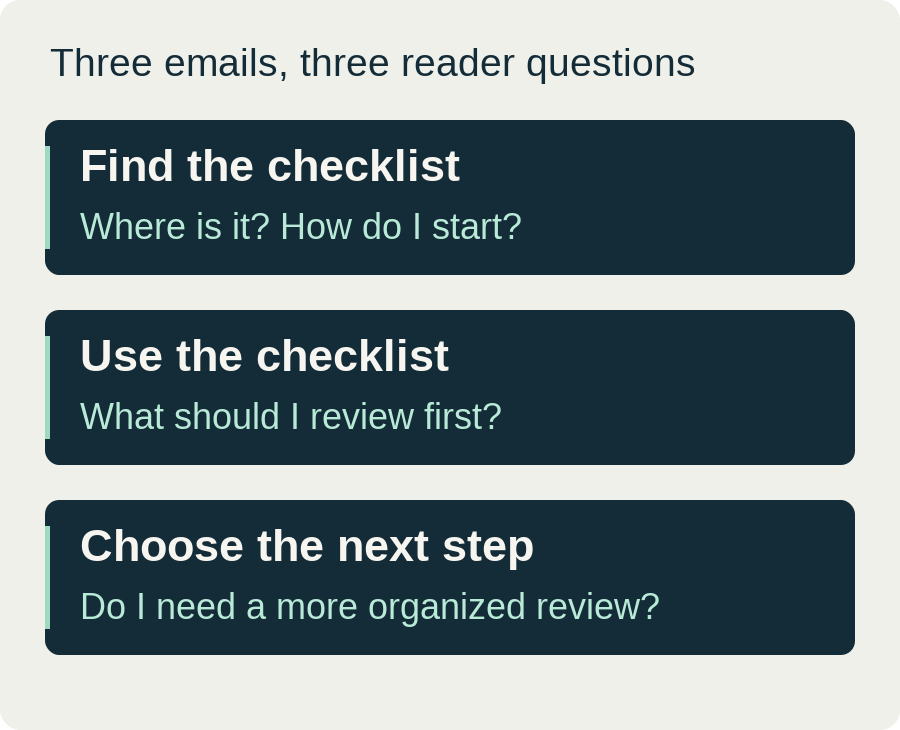
3. Plan three emails around three reader questions
These messages are editorial examples, not platform-generated templates. Their timing is a planning choice to test, not a conversion benchmark. Start with a short sequence you can maintain instead of an elaborate automation you cannot explain.
Email 1: Where is my checklist?
Example subject: Your website launch checklist: start with one page
Provide the download or access instructions first. Then suggest one small action: choose the homepage and check its main button. Explain how to report an access problem. A delivery message should not bury the promised resource beneath a long introduction.
Example body: “Here is the checklist you requested. Start with the page that most visitors see first. Check where its main button leads, then write down one issue to fix. If the file does not open, reply with the error message; please do not send passwords or account details.”
Email 2: How do I use it without reviewing everything?
Example subject: Check the path from one page to the next
Show a narrow exercise. Follow the main button, read the destination page, and check whether its heading matches the original promise. Explain the difference between seeing a form and testing its submission. Do not say “everything works” if delivery or receipt has not been checked.
Finish with one question the reader can answer privately: “Which page leaves the next action unclear?” You do not need a survey, a meeting booking, and a purchase request in the same message.
Email 3: What if I need a more organized review?
Example subject: An optional way to organize the issues you found
Summarize what the free checklist already covers. Introduce a paid template only if it addresses a remaining problem, such as tracking issues across several pages. Explain its contents, exclusions, format, and current purchase conditions on the destination page.
Let the reader continue with the free checklist. Avoid invented scarcity or claims that a purchase will produce traffic or revenue. If no relevant paid product exists yet, replace the pitch with another useful exercise rather than promising something unfinished.
4. Choose a manual pilot or a connected workflow
If you are still checking whether the resource is understandable, a small test with willing reviewers may be enough. Share the file through an appropriate channel and ask where they got stuck. Keep that content review separate from starting a marketing email list.
An existing email service may be sufficient when the signup form and delivery process already work. Migrating tools creates work of its own: content, sender settings, links, subscriber permissions, and testing all need attention.
systeme.io becomes a candidate when you want signup pages and follow-up emails in a connected environment. Its official features page describes funnel building, email campaigns, tagging, and automation. These capabilities suggest a possible home for this workflow; they do not prove that your own configuration is complete or that your emails will reach every inbox.
Before selecting a plan, check the official pricing page against your contact count and the resources your workflow needs. Avoid choosing a plan solely because it has more features. Write down the requirement that makes each extra feature necessary.
5. Test delivery and follow-up as separate steps
Use a test address you control and inspect the actual reader journey. Do not click your own affiliate link for this check. Record what you tested and what remains unverified.
| Check | What to inspect |
|---|---|
| Signup promise | Resource, sender, and follow-up description match the plan |
| Form submission | Expected confirmation appears; errors are understandable |
| File access | Correct version opens without unintended private information |
| First email | Resource is easy to find; links lead to the intended page |
| Later emails | Order and timing match the configured sequence |
| Leaving the sequence | Unsubscribe behavior is checked using the actual system |
| Mobile reading | Form, headings, links, and file remain usable on a small screen |
A successful submission is not proof of delivery. A delivered email is not proof that its download works. Keep these observations separate so a problem can be traced to the right step.
6. Measure the next useful change
Begin with a few clearly defined observations: signup attempts, completed signups, reported delivery problems, and clicks to the optional offer where your tools actually provide them. Label unavailable data as untracked or unknown. Do not treat missing measurement as zero.
For a small audience, individual feedback can explain more than a percentage with a tiny denominator. If readers cannot find the file, fix delivery before rewriting the offer. If the file is clear but the paid option feels unrelated, reconsider the product connection before adding more emails.
Start with one checklist and one clear promise. The aim is a useful reader journey you can maintain. For the broader product-launch plan, see our first systeme.io funnel guide. Use the service card below only when a connected workflow fits the problem you have identified.
Give the three messages different jobs
For a fictional checklist that helps someone select a post topic, the first message delivers the file and identifies the starting field. The second demonstrates how to narrow three candidate questions to one. The third can explain the boundary between the free exercise and an optional product, where that communication matches the signup promise.
Write the reader’s next action beside each message: choose a question, remove one competing idea, inspect the optional product only if needed. If every message mainly repeats the same sales link, it is not providing three distinct pieces of help.
These are content assignments to prepare before configuring automation. They are not results from a sent campaign, and the proposed sequence does not establish permission to send it to every resource recipient.
Check signup, delivery, and unsubscribe in one pass
Use a test inbox you control. Verify that the signup copy matches the messages received, the checklist opens on a phone, and unsubscribing stops the remaining test sequence. Note the first failed handoff so you can fix one part at a time.
Sources and scope
- systeme.io official features: product capabilities checked October 11, 2026.
- systeme.io official pricing: consult current plan conditions before selecting a plan.
- The checklist, email copy, and QA framework are original planning suggestions. No signup, delivery, conversion, or revenue results are claimed.